Running a GitOps Home Lab: Infrastructure as a Weekend Hobby
My home server runs 15+ self-hosted services managed entirely via Git commits. Here's the architecture, the stack, and why I think everyone in tech should have a home lab.
Self-hosting means running software on your own hardware instead of paying a service provider to run it for you. Your photos on your server, your password manager on your machine, your video library on your disk. You own the data, you manage the software, and you make all the tradeoffs. A home lab is the infrastructure that makes this practical: one or a few machines running permanently at home, usually low-power boards or mini-PCs, serving the apps you'd otherwise outsource to a cloud vendor.
I've been running one for a few years now, and it's become my favourite way to stay sharp on infrastructure outside of work. The setup has evolved from a single Raspberry Pi running Pi-hole into a proper GitOps-driven lab running 15+ services — all managed via Git commits.
Here's how it works and why I think more engineers should have one.
All configuration lives in github.com/ashishbhatiya18/homelab. The webauthn-proxy source is at github.com/ashishbhatiya18/webauthn-proxy.
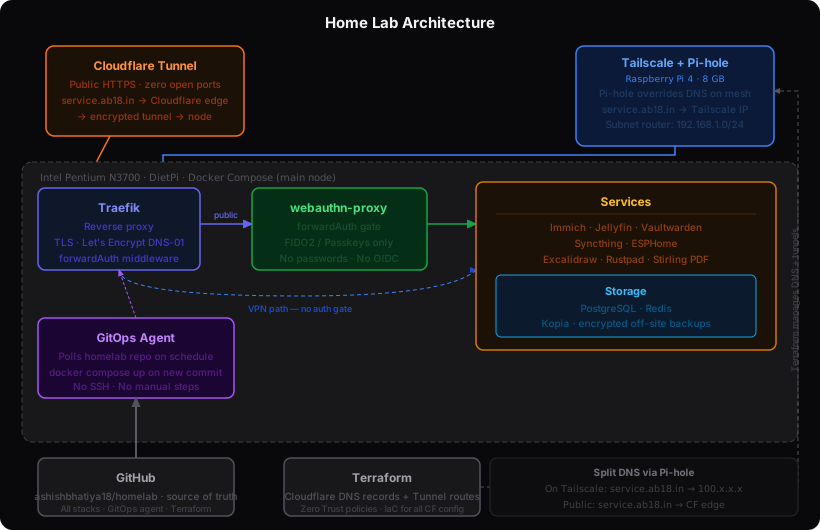
The hardware
Two machines. Both running 24×7. Both embarrassingly modest.
Intel Pentium N3700 @ 1.60GHz (4-core Braswell, ~6W TDP) — the main node. This is a 2015-era mini-PC running DietPi. It handles all the heavy lifting: Immich (with ML photo search), Jellyfin, Vaultwarden, Syncthing, ESPHome, PostgreSQL, Redis, and a handful of productivity tools. At idle it draws less than a laptop screen.
Raspberry Pi 4 (8 GB) — the network node. This one runs Pi-hole for network-wide ad blocking and acts as the DNS resolver for the Tailscale mesh (enabling split DNS). It also runs the Tailscale subnet router, advertising the home LAN so all Tailscale peers can reach every device on the network.
The fact that this is all sitting on an ~11-year-old Pentium and a Pi is the point. Most self-hosted workloads are IO-bound, not CPU-bound. If your services are sleeping most of the time, a $35 board and a decade-old NUC are more than enough.
The stack
Everything on both nodes runs in Docker Compose, and every stack is committed to a private Git repository called homelab.
Networking:
- Traefik — reverse proxy with automatic TLS via Let's Encrypt DNS challenge
- Tailscale — mesh VPN for private service access across all my devices, with subnet routing to expose the full
192.168.1.0/24LAN - Pi-hole — local DNS resolver, configured as the nameserver for the Tailscale network to enable split DNS
- Cloudflare Tunnels — zero-port-forward public exposure for selected services
- webauthn-proxy — FIDO2/passkey forward-auth gate in front of every public service (no passwords, no OIDC provider)
Storage & data:
- PostgreSQL — shared database for Immich and Vaultwarden
- Redis — cache for Immich
- Kopia — encrypted, deduplicated off-site backups
Self-hosted services:
- Immich — Google Photos replacement with ML-powered search
- Jellyfin — media server for local video and music
- Vaultwarden — self-hosted Bitwarden-compatible password manager
- Syncthing — continuous file sync across devices
- ESPHome — firmware for home automation sensors
- Excalidraw, Rustpad, Stirling PDF — productivity tools
Split DNS with Pi-hole and Tailscale
Every service has a public subdomain (e.g. immich.ab18.in). Without any special DNS configuration, that name always resolves to Cloudflare's edge — even when I'm at home or connected via Tailscale. Every request would make a round-trip to Cloudflare and back through the tunnel, adding latency and going through the webauthn-proxy auth gate unnecessarily.
Split DNS solves this cleanly. Pi-hole runs on the node and is set as the DNS nameserver for the Tailscale network. For every service subdomain, Pi-hole has a local override pointing to the node's Tailscale IP (100.x.x.x) instead of Cloudflare:
immich.ab18.in    → 100.x.x.x   (Tailscale IP, resolves internally)
jellyfin.ab18.in  → 100.x.x.x
vaultwarden.ab18.in → 100.x.x.x
When I'm on Tailscale, DNS resolves to the internal IP, traffic flows directly through Tailscale to Traefik, and the webauthn-proxy middleware is not applied — Traefik routes those requests straight to the service. When I'm off Tailscale, DNS resolves to Cloudflare, the tunnel is used, and the passkey gate is enforced.
The node also advertises its local subnet via Tailscale subnet routing:
tailscale up --advertise-routes=192.168.1.0/24 --accept-routes
This means any Tailscale peer can reach devices on my home LAN — printers, ESPHome sensors, other machines — without running Tailscale on each one.
Forward auth with webauthn-proxy
Every public-facing service sits behind a Traefik forwardAuth middleware that calls webauthn-proxy on each request. If no valid session cookie is present, the proxy redirects to a login page — where a fingerprint tap or Face ID is all you need. No username, no password, no OIDC redirect dance.
# Traefik middleware — one line protects any router
webauthn-auth:
  forwardAuth:
    address: "http://webauthn-proxy:4180/_webauthn/auth"
    trustForwardHeader: true
    authResponseHeaders:
      - "X-Webauthn-User"
The proxy stores only WebAuthn public keys — private keys never leave the device. It self-locks after the first credential is registered, so there's no permanently open registration endpoint.
Source and self-hosting instructions: github.com/ashishbhatiya18/webauthn-proxy
The GitOps agent
The piece I'm most proud of is the custom GitOps agent. It runs on the node and polls the homelab Git repository on a schedule. When it detects a new commit, it pulls the latest state and applies any changed Docker Compose stacks with docker compose up -d.
Deploying a new service or changing a configuration is as simple as:
git commit -m "add rustpad stack"
git push
The agent picks it up within minutes and applies the change. No SSH sessions, no manual docker compose commands. It's the same GitOps loop I use professionally, running at home lab scale.
Infrastructure as Code with Terraform
DNS records, Cloudflare Tunnel ingress rules, and Zero Trust access policies are all managed in Terraform. This has two benefits:
- Everything is version controlled. If I accidentally delete a DNS record,
git logtells me what it was andterraform applyputs it back. - Drift is impossible. Terraform's plan/apply cycle keeps the declared state and actual state in sync.
The Cloudflare provider handles creating tunnel routes — so adding a new public service is a one-line Terraform change and a git push.
Why bother?
Running a home lab keeps certain skills alive that are easy to lose if your daily work is purely product-focused:
- Debugging without a safety net. When something breaks at home, there's no on-call team. You figure it out.
- Infrastructure intuition. Understanding how networking, TLS, DNS, and container orchestration fit together makes you a better engineer at any level.
- Real ownership. Every architectural decision is yours, and you live with the consequences. That sharpens judgment quickly.
Beyond the skills angle, there's something deeply satisfying about hosting your own data. My photos live on my hardware, managed by software I understand and can inspect.
The most important thing I've learned
Start simple and grow incrementally. My first iteration was a single docker-compose.yml file with three services and no automation. The GitOps agent, Terraform, and multi-stack architecture came later, one problem at a time.
If you're starting out: get one service running on one machine. Then add the second. The automation follows naturally once you feel the pain of manual deployments.
Resources
- Homelab stacks — github.com/ashishbhatiya18/homelab: all Docker Compose stacks, GitOps agent, and Terraform config
- webauthn-proxy — github.com/ashishbhatiya18/webauthn-proxy: the FIDO2/passkey forward-auth proxy used to gate every public service
- Tailscale split DNS docs — tailscale.com/kb/1194/split-dns: how to configure Pi-hole (or any nameserver) as the resolver for specific domains on your Tailscale network